26 Categorical Data
A categorical variable records which group an individual belongs to. The group label can be a word or a number, such as a zip code, and a zip code cannot be averaged. Categorical variables need a different toolkit, because there is no number line to bin and no sum to average. The Dermagraft trial (Marston et al. 2003) asks whether the treatment arm a patient was assigned to, Dermagraft or standard care, affected whether that patient’s ulcer healed. Both variables are categorical, so the question is whether they are related.
Visualizing one categorical variable: the bar chart
The distribution of a categorical variable is the count of individuals in each category: a distribution table. The bar chart displays it, one bar per category, with length proportional to that category’s count.
The dataset lists the two hundred highest-grossing films released in the United States, compiled from box-office records (Adhikari et al. 2022). Each film carries several variables; the categorical one is the releasing studio. Counting how many films each studio released produces the distribution table.
movies = pd.read_csv(DATA + "top_movies_2017.csv")
print(movies.shape[0], "films;", movies["Studio"].nunique(), "distinct studios")

# value_counts() IS the distribution table: each category and its frequency.
studio_counts = movies["Studio"].value_counts()   # sorted high -> low by default
studio_counts.head(6)
200 films; 23 distinct studios
Studio
Buena Vista 35
Warner Brothers 29
Paramount 25
Fox 24
Universal 23
Disney 11
Name: count, dtype: int64fig, ax = plt.subplots(figsize=(7, 5))
studio_counts.sort_values().plot.barh(ax=ax, color=BLUE, edgecolor="white")
ax.set_xlabel("number of films in the top 200")
ax.set_ylabel("studio")
plt.show()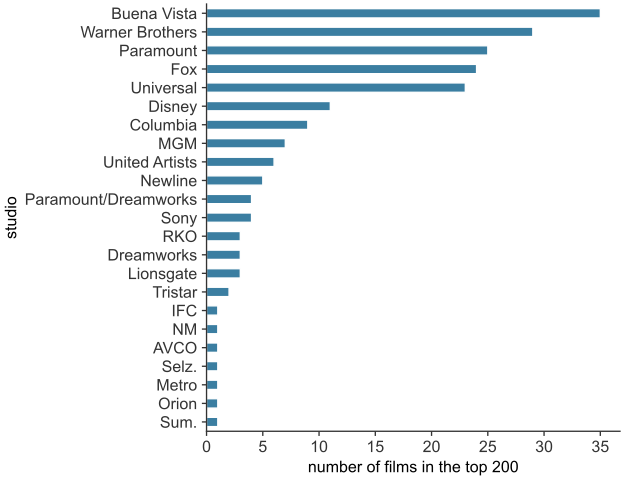
scripts/03_statistics/05_categorical_data/gen_categorical_data.py.
Two studios lead the top ranks: Buena Vista released \(35\) of the two hundred films and Warner Brothers \(29\) (see Figure 26.1). The rest are divided among twenty-one other studios; the next largest, Paramount, Fox, and Universal, each released roughly two dozen films. Because its categories are unordered labels, the bars are drawn with gaps between them and in any order. Nothing in the data fixes a sequence for “Fox,” “Disney,” and “Universal” the way the number line fixes \(6\) before \(7\). Sorting the bars by length changes the order and nothing else about the data. A histogram cannot be reordered this way, because its bars touch and their order is fixed by the numbers.
Comparing groups: counts can mislead
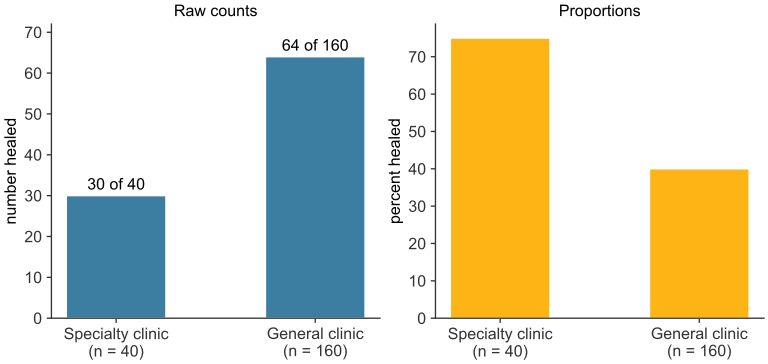
A bar chart displays one categorical variable. Comparing that variable across two groups of different sizes needs an extra step. Suppose a small specialty clinic and a large general clinic both treat ulcers, and each records whether the ulcer healed. Of \(40\) patients at the specialty clinic, \(30\) healed; of \(160\) at the general clinic, \(64\) healed. The general clinic produced more than twice as many healed cases, \(64\) against \(30\). But the two clinics differ in size, and comparing raw counts conflates a clinic’s size with the rate at which its patients healed.
clinics = pd.DataFrame({
    "group": ["Specialty clinic", "General clinic"],
    "n": [40, 160],
    "healed": [30, 64],
})
clinics["proportion healed"] = clinics["healed"] / clinics["n"]
clinics
group n healed proportion healed
0 Specialty clinic 40 30 0.75
1 General clinic 160 64 0.40Dividing each count by its group’s size gives the proportion healed: \(30/40 = 75\%\) at the specialty clinic, \(64/160 = 40\%\) at the general clinic. The comparison reverses. Normalized for size, the specialty clinic healed patients at nearly twice the rate of the general clinic.
labels = [f"{g}\n(n = {n})" for g, n in zip(clinics["group"], clinics["n"])]
fig, axes = plt.subplots(1, 2, figsize=(9, 3.8))

axes[0].bar(labels, clinics["healed"], width=0.5, color=BLUE, edgecolor="white")
for i, (h, n) in enumerate(zip(clinics["healed"], clinics["n"])):
    axes[0].text(i, h + 1.5, f"{h} of {n}", ha="center")
axes[0].set_ylim(0, 72)
axes[0].set_ylabel("number healed")
axes[0].set_title("Raw counts")

axes[1].bar(labels, 100 * clinics["proportion healed"], width=0.5,
            color=GOLD, edgecolor="white")
axes[1].set_ylabel("percent healed")
axes[1].set_title("Proportions")

plt.tight_layout()
plt.show()
The general clinic leads on raw counts, and the specialty clinic leads once each count is divided by its clinic’s size (see Figure 26.2).
scripts/03_statistics/05_categorical_data/gen_categorical_data.py.
When groups differ in size, compare proportions, not counts. Judged by raw counts, the general clinic looks like the more effective site, because it treats four times as many patients. The same correction applies to the Dermagraft trial. Its healing proportions are \(30.0\%\) against \(18.3\%\); its raw counts, \(39\) healed against \(21\), come from arms enrolling different numbers of patients.
Contingency tables and row proportions
A contingency table puts two categorical variables into a single table: one variable across the rows, the other across the columns, and each cell holds the count of individuals with that combination.
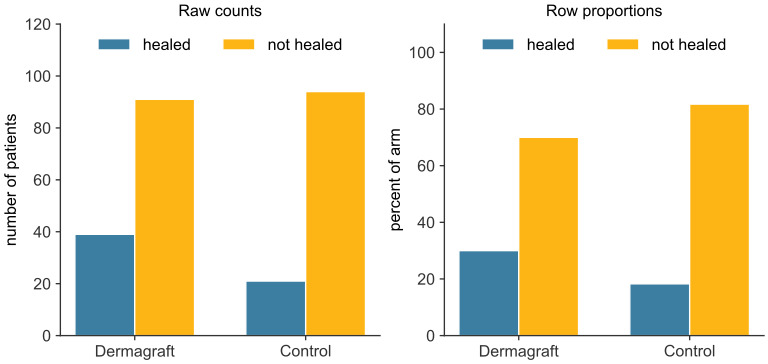
Of \(130\) patients assigned to Dermagraft, \(39\) healed and \(91\) did not; of \(115\) assigned to standard care, \(21\) healed and \(94\) did not (Marston et al. 2003).
table = pd.DataFrame(
    {"healed": [39, 21], "not healed": [130 - 39, 115 - 21]},
    index=["Dermagraft", "Control"],
)
table["total"] = table["healed"] + table["not healed"]
table
healed not healed total
Dermagraft 39 91 130
Control 21 94 115Each cell is a count for one combination of treatment and outcome. Raw counts cannot be compared directly, because the arms are different sizes (\(130\) against \(115\)). Dividing each row by its own total gives the row proportions, which for this table are the two healing rates.
row_prop = table[["healed", "not healed"]].div(table["total"], axis=0)
row_prop
healed not healed
Dermagraft 0.300000 0.700000
Control 0.182609 0.817391The Dermagraft row reads \(0.300\) and \(0.700\): \(30.0\%\) of Dermagraft patients healed, \(70.0\%\) did not, and the row sums to \(1\), since every Dermagraft patient falls in exactly one outcome. The control row reads \(18.3\%\) and \(81.7\%\). Reading down a column instead answers a different question: of everyone who healed, what fraction was on each treatment? That is the column proportion. Of the \(60\) patients who healed, \(39/60 = 65\%\) were on Dermagraft; of the \(185\) who did not, \(91/185 \approx 49\%\) were. Which direction to divide in depends on the question. Divide by the group sizes of the explanatory variable, the variable whose effect is studied. Here treatment is explanatory, since the trial assigned it. Row proportions therefore compare outcomes within a treatment arm. Column proportions compare arm composition within an outcome.
fig, axes = plt.subplots(1, 2, figsize=(9, 3.8))
x = np.arange(2)
width = 0.35

axes[0].bar(x - width/2, table["healed"], width, color=GREEN, edgecolor="white", label="healed")
axes[0].bar(x + width/2, table["not healed"], width, color=GOLD, edgecolor="white", label="not healed")
axes[0].set_xticks(x, table.index)
axes[0].set_ylabel("number of patients")
axes[0].set_title("Raw counts")
axes[0].legend()

axes[1].bar(x - width/2, 100 * row_prop["healed"], width, color=GREEN, edgecolor="white", label="healed")
axes[1].bar(x + width/2, 100 * row_prop["not healed"], width, color=GOLD, edgecolor="white", label="not healed")
axes[1].set_xticks(x, table.index)
axes[1].set_ylabel("percent of arm")
axes[1].set_title("Row proportions")
axes[1].legend()

plt.tight_layout()
plt.show()
Only the second panel compares the arms on a common scale, because each row is divided by its own arm size.
scripts/03_statistics/05_categorical_data/gen_categorical_data.py.
The two healing rates differ, \(30.0\%\) against \(18.3\%\) (see Figure 26.3). When the proportion of one variable differs across the categories of the other, the two variables are associated. A contingency table alone cannot say whether this association reflects a real effect of the treatment, or a difference that chance alone could produce if the treatment does nothing.
Comparing numerical data across groups
In a trial, the treatment arm is categorical while the outcome may be continuous. The tools for numerical data apply once per group, placed side by side. A box plot draws a box from the first quartile to the third quartile, with a line at the median. The box spans the interquartile range (IQR), so a wider box means a more spread-out group.
Suppose the Dermagraft trial had recorded not just whether each ulcer healed but by how much its area shrank, in \(\text{cm}^2\), after twelve weeks. A small illustrative sample: the treated group records \(1.2,\ 2.5,\ 3.0,\ 3.4,\ 4.1,\ 4.8\); the control group records \(0.4,\ 0.9,\ 1.1,\ 1.6,\ 2.0,\ 2.6\).
treated = np.array([1.2, 2.5, 3.0, 3.4, 4.1, 4.8])
control = np.array([0.4, 0.9, 1.1, 1.6, 2.0, 2.6])
print(f"treated mean reduction: {treated.mean():.2f} cm^2   "
      f"control mean reduction: {control.mean():.2f} cm^2")

fig, ax = plt.subplots(figsize=(6.5, 3.6))
ax.boxplot([control, treated], vert=False, widths=0.5, tick_labels=["control", "treated"])
ax.set_xlabel("reduction in ulcer area after 12 weeks (cm²)")
plt.show()
treated mean reduction: 3.17 cm^2 control mean reduction: 1.43 cm^2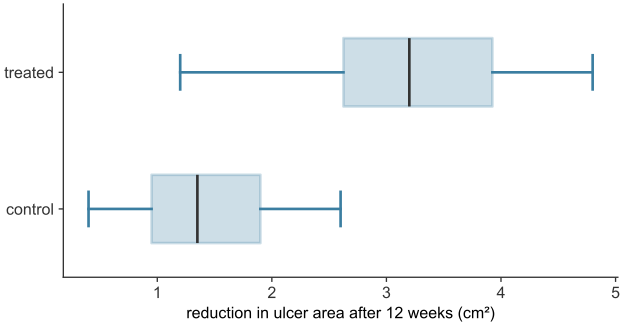
scripts/03_statistics/05_categorical_data/gen_categorical_data.py.
On a common axis, the treated group’s box sits entirely above the control group’s (see Figure 26.4), and its median is higher. The two distributions still overlap: the control group’s largest reduction exceeds the treated group’s smallest. The box plots suggest the groups differ, but they do not show whether the difference is larger than sampling chance would produce.
From proportions to a mean and a variance
A healing rate is a mean. Code each patient’s outcome as \(1\) if healed and \(0\) if not. The mean of that column, as defined in numerical data, is the sum of the values divided by their count. The sum of a column of \(0\)s and \(1\)s is the number of \(1\)s. So the mean of the coded column is the proportion healed: thirty patients coded \(1\) out of a hundred coded overall gives a mean of \(0.30\), the healing rate.
This means the tools built for numerical data, mean, variance, standard deviation, the sample-versus-population machinery, Bessel’s correction, apply to a categorical rate without modification, once coded. The variance has a closed form. With \(N\) patients, of whom a fraction \(p\) are coded \(1\) and \(1-p\) are coded \(0\), and mean \(p\), the population variance is
\[ \frac{1}{N}\Big[(Np)(1-p)^2 + N(1-p)(0-p)^2\Big] = p(1-p)^2 + (1-p)p^2 = p(1-p)\big[(1-p)+p\big] = p(1-p). \]
A binary variable’s variance is therefore always \(p(1-p)\): a single number computed from the rate itself, with no separate spread to estimate. For the Dermagraft arm, \(p = 0.30\) gives variance \(0.30 \times 0.70 = 0.21\) and standard deviation \(\sqrt{0.21} \approx 0.458\).